How to fill in a PDF for free
Add answers, ticks and a signature to a PDF, including forms with boxes that cannot be clicked.
Read the guide
Add rectangles, circles, lines, arrows, checkmarks, or crosses to your PDF, then customize their appearance.
Use this tool for free as often as you need. The document is processed on your device so its contents remain under your control.
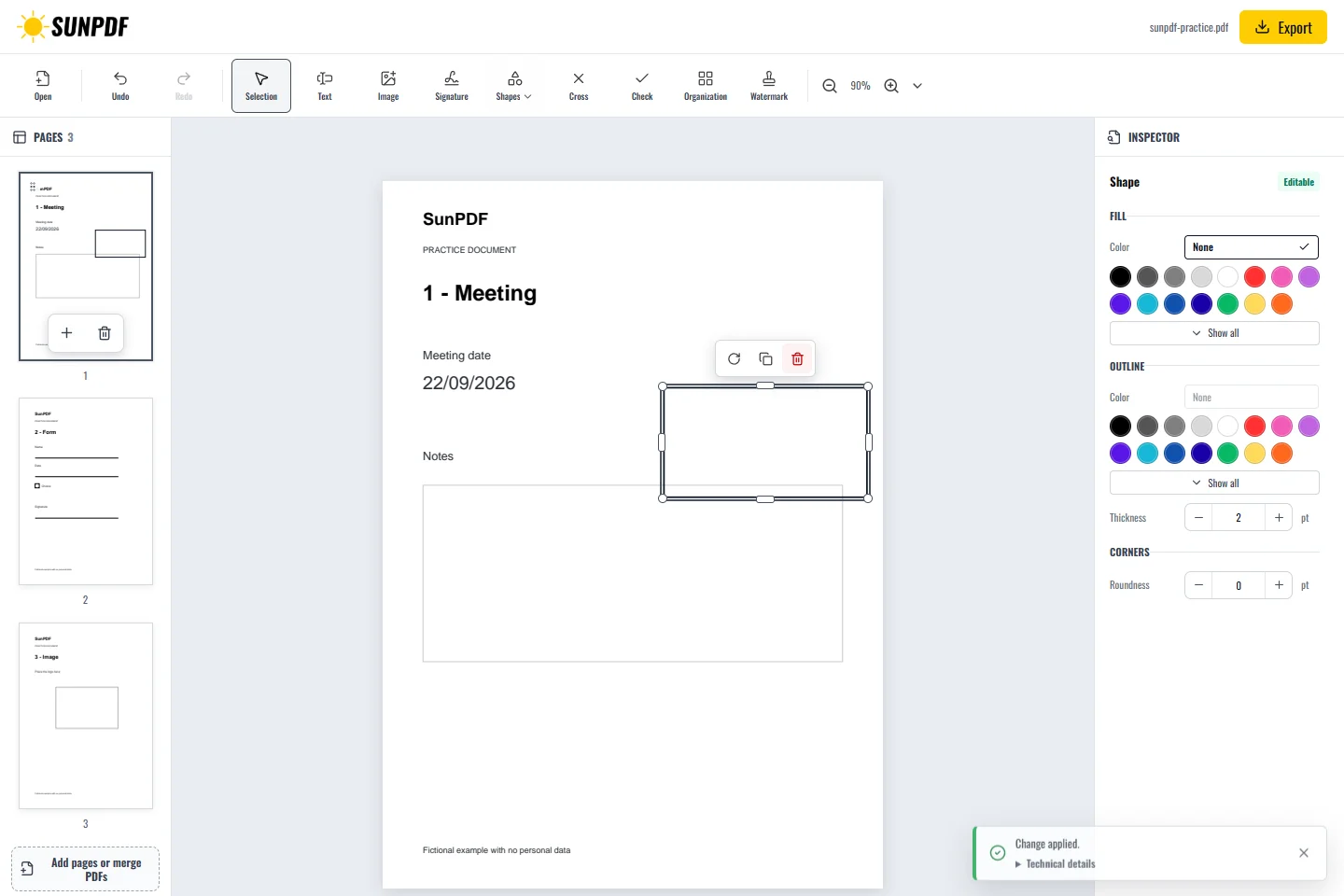
Fictional documents: three practice pages and an appendix, with no personal data.
Page 1: draw a rectangle around the date with a transparent fill to keep it readable. A rectangle does not delete text underneath.
Each shape can be moved and resized. Depending on the shape, you can also adjust its border, fill, thickness or arrow style.
Document processing happens in your browser. SunPDF does not upload your PDF to a server for editing. Closing or refreshing the tab ends the current session.
Shapes draw attention to an area or add a visible instruction without deleting the content underneath.
Check colour, thickness, and contrast, then zoom into every shape to make sure it does not cover important information.
Follow the steps and checks to make before saving your document.
Add answers, ticks and a signature to a PDF, including forms with boxes that cannot be clicked.
Read the guideCorrect, complete and organize a PDF for free, then download a new copy from your browser.
Read the guideDraw or add your signature, place it on the right line and download the signed PDF.
Read the guide